


ℹ️ Skip to key parts of the session by clicking on the chapter dots along the timeline.
Welcome to a walk through the Skills Market workshop with Charles Burdett, Author of Workshop Tactics - and the Pip Decks community, of course! We’ve got attendees from California, Iowa, Bolton (UK) and Charles is in Manchester.
As usual, we’re kicking off with a pre-prepared Skills Market Miro Board, which you can download from the Vault or recreate yourself. The session was run and recorded on Butter.io, so if you plan to use both of those tools yourself this will give you a great overview of how they work together.
This tactic also works really well in person, which Charles explains along the way.
So, what is Skills Market about?
Charles starts by explaining that it’s a great team-building exercise. It’s useful in a range of contexts - particularly with a new team that needs to work out what skills and abilities exist among the members. But it can also be done in meetings, in already-established teams and on new projects.
You’ll find out little secrets about people! Like copywriters or artists that you didn’t know existed. There was a secret techie in this session, for example.
It’s more engaging and comfortable than going around a circle and asking everyone to blow their own trumpets. This makes it more socially acceptable to show off your talents - hidden or otherwise.
Getting started
The first step is to set out your stall! Take a look at the image below. The three ‘shelves’ on the stall are labelled ‘Current skills’ (top shelf), ‘Hidden skills’ (middle shelf) and ‘Desired skills’ (bottom shelf). Each attendee gets their own stall. You can recreate this in person by asking people to draw their own stall.
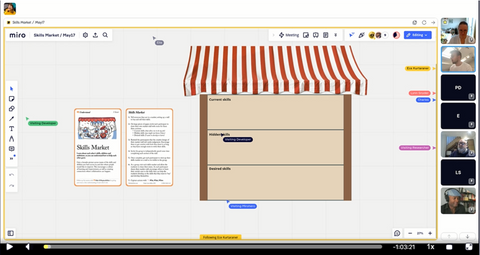
Tell everyone they’re at a market and ask them to fill in their own stall with their skills:
- Current skills: the ones that allow them to do the job they’re currently in.
- Hidden skills: such as languages, creative skills, hobbies or past vocational skills. Can be related or unrelated to their current role.
- Desired skills: the skills they’re actively trying to improve.*
You could just ask everyone to fill these in using virtual post-it notes. But it can be fun to suggest that they grab images from a search engine or list of emojis to represent each skill.
*This is a key feature of this tactic! It helps participants identify people who wants to learn something they can teach, or who can teach them something that they want to learn.
This is the point where you set a ten-minute timer and let Butter.io play some dreamy lo-fi music while the participants crack on with the task. At the end of the task, you can use the ‘Bring everyone to me’ feature on Miro to get everyone back in the same part of the workspace.
Sharing skills
The next step is to go around the market (room) and ask each person to explain their skills stall.
Here’s a closer look at André’s stall from the walk-through.

If you were running this session for real, you’d ask all the other participants to put their initials next to any of the skills he has that are on their desired list. They can also put their initials next to skills that he wants to learn that they could teach him.
And here’s Charles’ more graphic-oriented stall.

And finally, Ece (Pip Decks’ Community Events Officer) showed off one of her hidden skills: using emojis!

Watch the session from the ‘Timer Stops’ chapter to see André, Claire, Charles, Carl, Niha and Ece talk through their stalls. For reference, that’s six participants and it took around 20 minutes, but that will vary considerably depending on how well the people know each other, how much they put on their stalls and how much overlap there is between current/hidden and desired skills.
Final steps
The final stage is to use the ‘Who, What, When’ tactic to create a list of who is interested in learning what, and from whom, and then setting a time to do that. You can see how this works in the session even though it’s not a real project.
Cool down
Charles asked everyone to use three post-its to list their:
- Biggest learning
- Biggest surprise
- Biggest remaining question/request for future follow-up sessions
And that’s it - a tour of a tactic that helps you have some really useful conversations.
Takeaways - learnings and surprises
You might find that lots of people have the same desired skills - depending on why the group is together, this could be a goldmine for you to find/suggest training or development opportunities. It also helps you find opportunities to develop coaching, mentoring, skill sharing and networking between the participants.
Claire mentioned that seeing the card used in practice was really helpful (so do watch the recording at the top of the screen!).
André's biggest surprise? How much fun it was! And how great the community element is, too.
Another participant was surprised at how wide the range of skills was even in a small group.
Questions
Does anyone have Miro templates they use?
Yes - they’re in the Vault! If you have a Pro Miro account you can upload the template to use yourself; if not, you can view it and copy it yourself.
Thanks to everyone that attended the session and took part!



One of the few newsletters I look forward to.
- Dave Cunningham, Head of DesignOps @ NHS
